AI-assisted research, source-checked and reviewed by a human editor. How we work
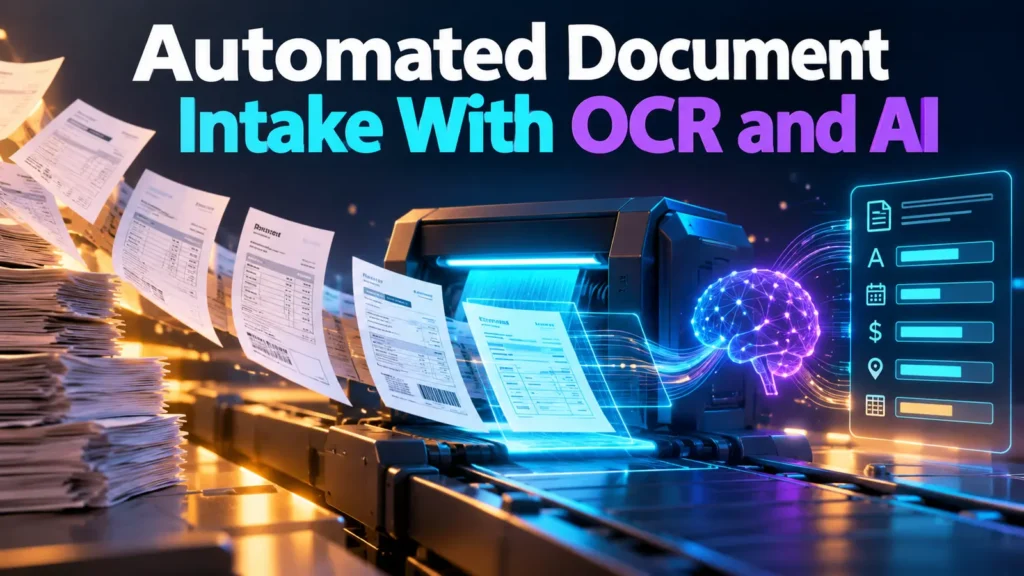
Document intake automation often fails at the handoff between a scanned page and a trusted business record. OCR may misread numbers, layouts may confuse fields, and AI extraction can sound certain when a value is missing. This guide builds a reviewable pipeline with validation and exception handling.
Decide which documents belong in the workflow
Start with a narrowly defined type such as a standardized supplier invoice or incoming form. Identify which fields staff need, where values originate, and which omissions should trigger review. Do not put contracts, IDs, or medical records into a trial without authorization and an appropriate privacy assessment.
Separate OCR from interpretation
Optical character recognition converts visual page content into machine-readable text. That extraction can be wrong on low-quality scans, handwriting, multi-column layouts, or tables. AI can then classify or extract structured fields, but an elegant JSON response does not prove its values are correct. Retain page references and inspect the original image for consequential fields.
Design structured output
Define required fields, allowed formats, and validation rules before selecting a model. For an invoice, fields might include vendor name, invoice number, currency, issue date, and total. Validate dates, arithmetic, identifiers, and duplicates outside the model. Keep a separate status for missing or unreadable information instead of filling gaps with plausible values.
Use confidence and exceptions carefully
A model-generated confidence score is not automatically a calibrated probability. Route ambiguous values, mismatched totals, unsupported document types, and suspicious attachments to an authorized reviewer. Set review thresholds using a labeled test set and the financial or operational consequence of error, not a vendor’s advertised extraction rate.
Secure the document pipeline
Use malware scanning where appropriate, controlled upload locations, restricted processing identities, encryption and retention policies. Check service terms before transferring sensitive files to any processor. Separate extracted data from the original records and record who corrected values. Never permit a document’s hidden text to grant an AI agent new system permissions.
Measure end-to-end savings
Compare manual entry with the automated path including document preparation, OCR corrections, reviewer time, and exception handling. Use samples that represent real scan quality and layout variation. Track field-level accuracy and critical error rate rather than only how many documents reached the final queue.
Roll out with a manual fallback
Begin in shadow mode, where staff perform normal processing while the new system proposes extracted fields. Once the results are acceptable, allow limited reviewed transfers into business systems. Document how to pause processing, re-run failed items, and correct records after an error.
Worked invoice extraction example
A fictional supplier invoice includes a vendor name, invoice number, amount, tax, and due date. The system should extract each field with the source page reference, then validate totals and currency outside the model. If a low-resolution scan makes a digit ambiguous, return an exception for human review rather than inventing a value. Run shadow-mode tests against manually verified invoices before any transfer into accounting software. The evaluation must include staff correction time and duplicate-document detection.
Document intake workflow, from upload to approval
Begin with a narrow document type that employees already understand, such as standardized invoices from approved suppliers. The intake service stores files in a controlled location and records an identifier, upload time, and source. Perform appropriate file checks before processing, then extract page text through OCR. An AI stage may propose fields, but a separate validation stage must decide which values are plausible and which require review.
Define fields and validation rules
For an invoice, choose vendor name, invoice number, currency, issue date, due date, line totals, tax, and invoice total. Validate numeric formats, required fields, and arithmetic outside the model. Match vendor identifiers against approved records where authorized. An unreadable date should remain missing; it must not be filled with an invented value that looks convenient.
Keep original evidence visible
For each extracted value, preserve a page or location reference so a reviewer can inspect it against the original image. OCR can confuse visually similar characters, and tables can be rearranged by multi-column extraction. Review high-impact fields against the scan instead of trusting a neatly formatted output. Record corrections so recurring document problems can be investigated.
Handle exceptions and duplicates
Route mismatched totals, missing mandatory information, conflicting invoices, unrecognized suppliers, and unexpected document types to a human. Compare invoice identifiers with previously processed records before creating financial entries. Automation should not bypass a purchase-order approval process just because a model extracted all required fields. Keep rejected documents and correction notes according to the organization’s retention policy.
A safe pilot in shadow mode
During an initial trial, employees continue the existing intake workflow while AI proposes extracted fields for comparison. Use representative scans, including low-quality images, different layouts, and multi-page documents. Track field-level agreement, critical financial errors, time to review exceptions, and total processing effort. Do not claim that the approach saves time until these measures are compared with an appropriate manual baseline.
When to expand
Only connect the pipeline to accounting or other production systems after evaluating data handling, authorization, auditability, and rollback procedures. The connected identity should have the minimum required rights. If documents contain personal or regulated data, consult the relevant policy owners before processing them with a third-party service. Microsoft’s Document Intelligence overview provides one example of an official document-processing reference, not proof that any particular workflow is accurate.
Decision record and stopping conditions
The safest early document intake design treats extraction as a proposal. Even when a model recognizes vendor, amount, and date, validation and the appropriate human approval must happen before a ledger is changed or payment is triggered. Record which page supports each corrected field, who changed it, and why. Handle failed uploads without duplicating records. Measure total workflow effort, including exception handling, not simply how quickly OCR produces text.
Maintain the OCR workflow when document layouts change
Document-type changes create practical maintenance work. A supplier may revise its invoice layout, move a tax field, or send a scan with a rotated page. Track extraction failures by layout and supplier so reviewers can identify regressions. Establish a procedure for versions of templates and OCR models, and test old examples after an update. For financial processing, reconcile totals and ensure duplicated invoice IDs are flagged before posting records. Store the original document and correction log only for the retention period allowed by policy. If errors remain expensive to resolve or vendor privacy terms are unsuitable, continue manual intake instead of enabling automatic accounting writes.
Final verification scenario
Consider an exception where a receipt shows one total but its line items add to a different amount. The extraction system should report the discrepancy rather than choose whichever number appears more prominent. The finance reviewer checks the original document and applicable rules before correcting the record. This illustrates why a successful OCR operation is not equivalent to approved accounting data. The workflow needs a consistent handoff for unresolved discrepancies.
Frequently asked questions
Is OCR alone enough for invoice intake?
No. Structured extraction and independent validation of totals and identifiers are necessary.
What happens when text is unreadable?
Flag the field as missing or uncertain and route it to human review.
How should savings be measured?
Compare complete processing time, including corrections and exceptions.
Related ThriftBeam guide: Checking OCR and scanned-document quality. Use this companion checklist when evaluating the workflow.
Sources and limitations
This documentation-based editorial draft describes a general evaluation method; it does not claim firsthand product testing.
AI-assisted draft. Human editorial approval required before publication.